NB Projects
  NB Procure
  NB Assets
  NB Quality
  NB Payroll
  NB PDC Manager
  NB India GST
  NB Credits
  NB Procure - Amazon Business Connector
  NB Scheduler

Microsoft Dynamics 365 Business Central Essentials License is Microsoft’s cloud-first ERP licensing option for non-manufacturing small and mid-sized businesses that require integrated finance, inventory, purchasing, sales, and project accounting, delivered primarily through Microsoft Azure.
Introduction: Why Growing SMBs Move from Spreadsheets and Basic Accounting Software to Cloud ERP
Across global markets, growing businesses in distribution, retail, trading, and professional services eventually reach a point where spreadsheets and basic accounting tools can no longer support operational complexity. What begins as a simple finance challenge quickly becomes an issue of disconnected inventory, delayed reporting, and poor cross-department visibility.
This is where the Dynamics 365 Business Central Essentials License fits best. It is designed specifically for non-manufacturing, operations-driven SMBs that require strong control over finance, inventory, purchasing, sales processing, and project costing—within a secure, Microsoft-managed cloud environment.
At Buy Business Central, we support organizations worldwide in migrating from QuickBooks, Tally, Xero, Zoho, and Sage to Business Central Essentials, configuring the system to match real-world distribution, retail, trading, and project-based service models.
What Is Microsoft Dynamics 365 Business Central Essentials License?
The Microsoft Dynamics 365 Business Central Essentials License is Microsoft’s cloud-first ERP license for organizations that do not require manufacturing or service dispatch functionality. It brings together financial management, supply chain operations, sales processing, project accounting, and business reporting into one unified cloud ERP system.
Business Central online is available in over 170 countries and regions worldwide through a combination of Microsoft-native capabilities and partner-provided localizations via AppSource. The platform supports multiple currencies and multiple languages, and in regions where localization is available, it includes regulatory and tax compliance support such as VAT, GST, sales tax, and statutory reporting.
Unlike entry-level accounting software, Business Central serves as a single system of record across departments, providing real-time financial and operational visibility for management and decision-makers.
Who Should Use Business Central Essentials?
Business Central Essentials is purpose-built for non-manufacturing, non-field-service organizations that buy, sell, stock, invoice, and manage projects at scale. It is an excellent fit for:
- Wholesale and distribution businesses
- Retail and eCommerce companies
- Import–export and trading firms
- Professional services such as IT consulting and agencies
- Project-based service providers
- Multi-location SMBs with centralized finance
It is especially effective for businesses that operate across multiple locations, manage high transaction volumes, track project profitability, and are upgrading from accounting-only systems.
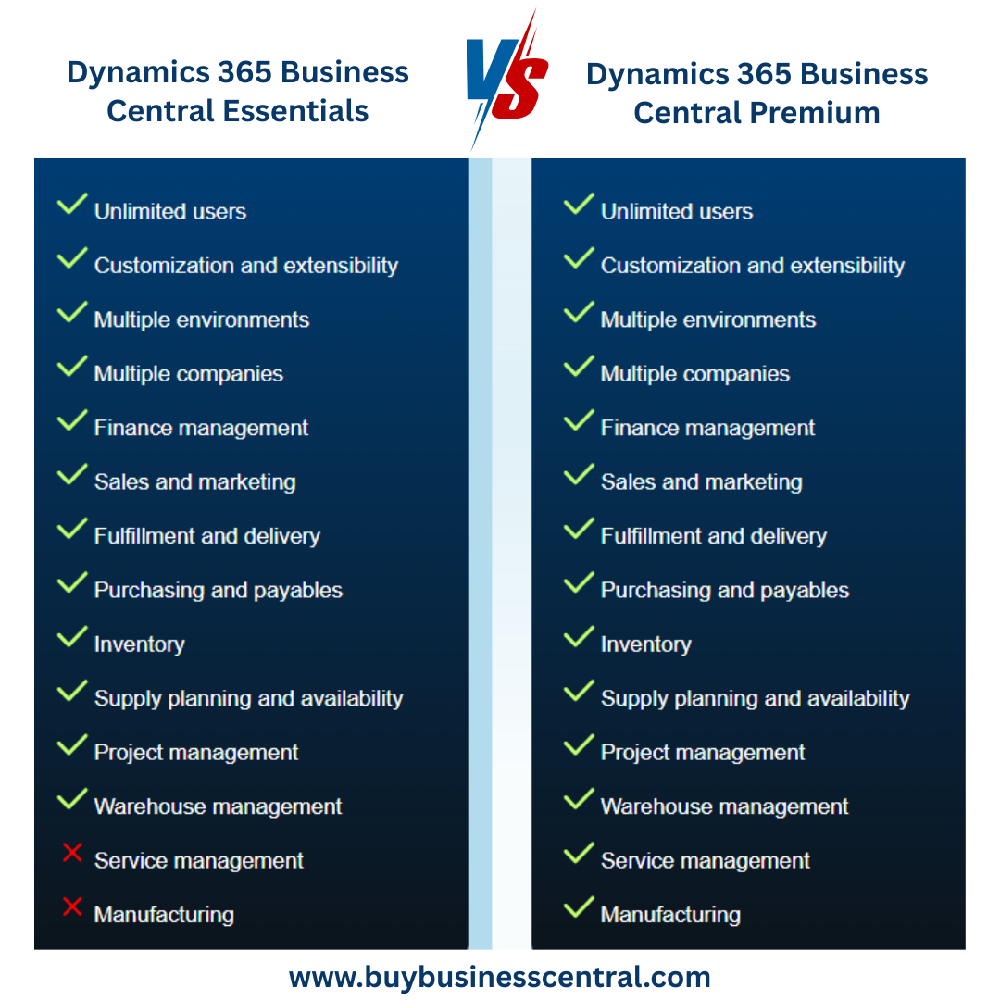
What Business Central Essentials Does NOT Include
For functional accuracy, it is important to note that the Dynamics 365 Business Central Essentials License does not include:
- Manufacturing (BOM, routing, production planning, MRP)
- Service contracts and service order processing
- Technician and field resource dispatch
- Equipment maintenance management
Organizations that require these capabilities must choose Business Central Premium Licence instead.
Core Capabilities of Business Central Essentials
1. Financial Management
Business Central Essentials delivers full enterprise-grade financial control with general ledger accounting, payables and receivables, budgeting, cash-flow forecasting, fixed assets, automated bank reconciliation, and multi-jurisdiction tax handling. Finance teams gain real-time, audit-ready visibility across all entities.
2. Purchasing, Inventory & Supply Chain
The platform supports complete purchasing and inventory operations for distribution and trading environments, including real-time stock visibility, vendor management, purchase and sales order processing, stock transfers, and basic warehouse operations. Item variants, lot tracking, and serial tracking ensure operational accuracy across locations.
3. Sales & Customer Transaction Management
Essentials includes integrated customer management, opportunity tracking, and full quote-to-order-to-invoice automation. All customer transactions are directly linked to accounting, ensuring clean financial traceability across the sales cycle. For advanced CRM automation, it integrates seamlessly with Dynamics 365 Sales.
4. Project & Job Management
For project-driven organizations, the system supports project budgeting, time and expense tracking, WIP accounting, resource allocation, and project-level profitability analysis. This is ideal for consulting firms, IT services companies, agencies, and other billable project environments.
D365 Business Central Essentials vs Premium
Microsoft Cloud, Power Platform & AI Advantage in Business Central Essentials
Business Central Essentials is natively integrated with the broader Microsoft ecosystem. Users work directly from familiar tools such as Outlook, Excel, and Microsoft Teams, improving adoption and productivity. Power BI enables real-time dashboards, while Power Automate supports low-code workflow automation. Microsoft Copilot and AI-assisted insights are being rolled out in phases depending on region, update wave, and licensing eligibility.
The solution runs on Microsoft Azure, offering enterprise-grade security with encryption, role-based access, high availability, disaster recovery, and compliance with global regulatory standards.
Strategic Business Benefits of Dynamics 365 Business Central Essentials License
Organizations using Dynamics 365 Business Central Essentials License benefit from a single source of truth across finance and operations, global scalability for multi-entity businesses, continuous Microsoft upgrades, low-code customization without disrupting upgrades, and faster user adoption through familiar Microsoft interfaces.
At Buy Business Central, every deployment is structured to ensure long-term scalability, compliance, and upgrade safety.
Frequently Asked Questions
1. Is Business Central Essentials suitable for all SMBs?
No. It is specifically designed for distribution, retail, trading, and project-based professional services. Manufacturing and service-dispatch organizations require the Business Central Premium license for production and field service capabilities.
2. What is not included in Business Central Essentials?
Manufacturing, service contracts, service order management, and technician dispatch are not included in the Essentials license. Businesses that require these operational capabilities must use the Premium edition instead.
3. Can I upgrade from Business Central Essentials to Premium later?
Yes. You can upgrade from Business Central Essentials to Premium Licence at any time through a simple license change. There is no data loss, no re-implementation, and no system downtime during the upgrade process.
4. Is Business Central Essentials suitable for multi-country operations?
Yes. It supports multi-currency, multi-language, and country-specific tax compliance such as VAT, GST, and sales tax, making it suitable for organizations operating across multiple countries.
5. Is Business Central Essentials cloud-only?
Business Central Essentials is offered primarily as a Microsoft Azure SaaS cloud solution. A separate on-premises licensing model is available for organizations with regulatory or infrastructure constraints.
6. Is Business Central suitable for hybrid and remote teams?
Yes. It is a fully browser-based cloud ERP that allows secure access from anywhere without a VPN. It also supports mobile devices and role-based security for remote users.
7. Can Business Central replace QuickBooks, Tally, or Xero?
Yes. Many growing organizations choose Dynamics 365 Business Central as they outgrow accounting-only tools such as QuickBooks, Tally, or Xero. Business Central provides integrated finance, inventory, sales, and project management in a single ERP system, which basic accounting platforms do not offer.
8. Does Business Central Essentials include AI features?
Yes. Microsoft is rolling out AI and Copilot capabilities in phases based on region, update wave, and licensing eligibility. These features enhance forecasting, reporting, and decision-making over time.
Why Choose Buy Business Central?
Buy Business Central is purpose-built for organizations that want to implement Microsoft Dynamics 365 Business Central correctly the first time. With 15+ years of ERP experience and a sole focus on Business Central, we deliver secure cloud implementations, industry-specific configurations, and zero-disruption legacy data migration.
Our clients choose us because we reduce project risk, protect long-term upgrade paths, and ensure that Business Central is fully aligned with real-world distribution, retail, trading, and project accounting operations.
Conclusion: A Cloud ERP Built for SMB Growth
The Dynamics 365 Business Central Essentials License is a well-suited cloud ERP platform for distribution, retail, trading, and project-based service organizations, offering a scalable and secure foundation for global operations.
By unifying finance, purchasing, inventory, sales, and projects into a single intelligent system, it enables better visibility, stronger control, and more informed decision-making for long-term growth.
Ready to Evaluate Business Central Essentials for Your Organization?
Connect with Buy Business Central for a personalized assessment and see how the Dynamics 365 Business Central Essentials License can be configured precisely for your global business model.